

Updated May 5, 2026
If you run an online business and use Airtable (or Google Sheets) to organize your data, you’ve probably hit the same wall I did: you want to display that data beautifully — on your website, inside your courses, on a sales page — without hiring a developer or spending your entire weekend copy-pasting things manually, especially when you’re dealing with a LOT of rapidly changing info, like when you’re hosting a summit, bundle, or some other collaborative event.
That’s where tools like Softr, Shareables, and BlockBuilder come in. All three let you pull live data from Airtable or Google Sheets (and many other sources, more on that below) and turn it into something your audience can actually see and interact with – clickable, filterable, searchable, and best of all: self-updating. But they do it in very different ways, at very different price points.
I’ve been using Softr in my business since 2023. It absolutely saved my life when I ran a ~$70k grossing digital product bundle with a lot of offers and moving pieces. Since then, I’ve found lots of other ways to use Softr in my business. See 8 unique ways here on my other blog. I recently grabbed Shareables on AppSumo (Tier 3), and I also just picked up BlockBuilder — a newer tool that does something none of the others can: embed live data blocks directly into emails. Both are lifetime deals; purchase once, use forever, and benefit from all the improvements to the app to come. Softr is on a subscription basis and plans start at $49/mo, so you can see the major appeal of the lifetime deals.
Let me break down what each tool does, who it’s best for, and help you figure out which one (or combination!) makes the most sense for your business.
Softr: The Powerful, Mature Option
Softr is the OG in this space for no-code course creators and online business owners. It connects natively to Airtable and lets you build everything from simple embeddable blocks to full no-code web apps and webites, like think member portals, bundle dashboards, searchable FAQ libraries, and resource hubs. I’ve used it in eight different ways in my own business, and I’m still finding new use cases.
I love it so much I even created Softr templates and included them inside my product, Product + Affiliate Hub for Airtable. If you want to see exactly how I set things up and a real-life, lucrative example with step-by-step tutorials, that’s a great place to start.
What I Love About Softr
- Stability and maturity. Softr has healthy MRR (that means they have a real, paying user base and therefore can afford live customer support agents and constant improvements and new feature development – its a super good thing) and a real user base. That means consistent updates, reliable customer support, a pretty lively user community forum, and a platform that’s not going anywhere.
- Build complex, powerful apps. Need a member portal with login-protected content that pulls dynamically from Airtable, Google Sheet, Notion, SmartSuite and elsewhere? Multi-page websites with multiple widgets on a single page? That’s Softr’s sweet spot. No other tool in this comparison can touch it for complexity and power.
- Strong page builder. Unlike the other two apps I’m reviewing in this post, Softr is the only one that really does let you build a whole website, with prebuilt blocks for heros, headers, footers, galleries, featured grids, pricing comparisons, CTAs, blank html blocks and more. You really can build a whole website with it, and Shareables and BlockBuilder can’t come close.
- Customizable subdomains and custom domains. You can specify your own subdomain (like yourname.softr.app) and connect a custom domain per app, so you can build genuinely branded experiences. Sometimes buying a domain and setting up a custom domain is just too much hassle, I love being able to set a custom subdomain in like… 7 seconds.
- Deep integrations. Webhooks, built-in form builders, automations/workflows, secure user accounts with login-gated content, and tons of third-party integrations make Softr incredibly versatile.
- Embeds beautifully inside courses. I use it for FAQs, template libraries, slide deck embeds, Q&A replays, and more — all embedded right inside my course platforms or on landing pages. Want to see an example? Check out my Airtable Resources page and scroll to the bottom. You’ll see all the Airtable offers I have, and every time I add a new one, it’ll magically appear there.
- Button and design customization. You can control button width, alignment, add icons, and have more granular control over fonts and sizing than Shareables offers. I know that sounds like small beans, but if you’re design obsessed like me, it matters.
- Excellent customer support. I love love love when an app or tool I pay for has a real live agent chat support feature. Not AI, not a bot, not a form, REAL humans who know and love the software and are down to roll up their sleeves with you. Softr excels here!
Where Softr Falls Short
- It’s expensive. $49/month is just the starting point. If you need more published apps, more users, or embedding features, the price climbs fast.
- Clunky design editing. Adjusting fonts, colors, and spacing feels more painful than it should for a no-code tool.
- No live preview. You have to publish to test click and hover interactions — you can’t test them right in the dashboard like you can with Shareables.
- No email embeds. You can embed Softr blocks on webpages, but not inside emails.
- Analytics are limited or not available at all. When you’re building an app, embed or tool for your audience or team, it’s super helpful to see how they interacting with it and other analytics. Softr gates this in a higher price tier and I found what is provided to be sorta limited.
Shareables: The Smart AppSumo Deal for Course Creators and Marketers — Ending Soon
⏰ Heads up: Shareables is leaving AppSumo on May 11, 2026 at 12pm CT/Chicago. Once it’s gone, you’ll only have the option of a monthly or annual subscription instead of the lifetime deal. If you’re on the fence, now is the time to decide.
Shareables is a newer tool currently available on AppSumo at a lifetime price — and it’s a genuinely solid deal that’s getting better fast. It takes your Airtable, Google Sheets, Notion, Smartsuite, Stackby, Excel, and now 12 total data sources and turns them into interactive, embeddable widgets you can drop onto any website.
My take on tiers: Tier 1 is too limiting (only 10 widgets — you’ll burn through them fast). Tier 2 works ok for most folks. Tier 3 is for power users who are already heavy into this type of tool – its the lowest tier I’d recommend if you’re coming from Softr. I got Tier 3, might upgrade to get more widgets and published sites. Get it before it’s gone from AppSumo on May 11, 2026 at 12pm CT/Chicago.
What I Like About Shareables
- Easy to get started with a good template library. Onboarding is smooth and the templates give you a solid starting point fast.
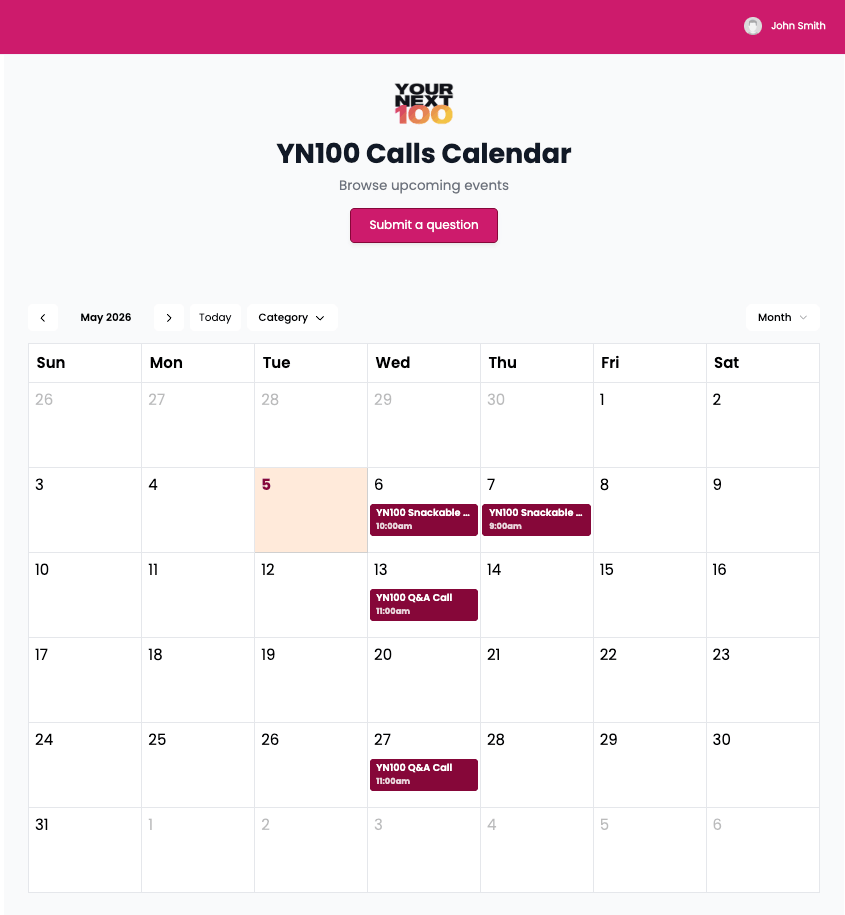
- The Calendar widget is excellent. I’m already using it for my group program and love it – see it below.
- Live, clickable dashboard preview. Unlike Softr, you get a fully working live preview right inside the dashboard — click to test, hover to inspect, and immediately edit any element by clicking the Settings cog. Big time-saver.
- Detail pages are fast and user-friendly to create. More intuitive than Softr for spinning up detail views quickly.
- 12 data sources and growing. Airtable, Google Sheets, Notion, Smartsuite, Stackby, Excel, AITable, Trello, and more. More flexibility than Softr or BlockBuilder.
- Solid built-in analytics. Track unique visitors, page loads, impressions, engagements, and payments across four time filters. Display-only for now, but useful.
- Customizable subdomains. Recently added — you can now set your own subdomain (my-cool-site.shareables.ai) instead of an auto-generated random one. First-come, first-served, so grab yours early.
- Button and field icons. 1,500+ icons you can add to your buttons, this feature is recently added. It may seem like a small touch, but I really like icons on buttons for site visitors who are skimmers. They let you give your widgets a polished look without touching any code.
- Password protection for gating content. Works well — see the caveat below about placement.
- Payment integrations. Gate content or take payments via PayPal or Stripe. This feature isn’t amazing yet, but give the founder time.
- One-time price on AppSumo. Way better than paying $49+/month forever. Yes, even Tier 2 or 3, suuuuuper worth it. Heads up: this deal ends May 11, 2026!
See the Shareables calenar widget in action – as used in my group program, Your Next 100:
What’s New in Shareables (Recent Updates)
Shareables has been shipping updates fast — including two features I originally called out as missing in this post:
- Customizable subdomains (Mar 30). Set your own subdomain instead of auto-generated nonsense. First-come, first-served.
- Button and field icons (Apr 6). 1,500+ icons via Lucide for buttons and field labels.
- Project Brand Colors (Mar 27). Set your brand colors once at the project level — available in every widget in that project.
- URL Filter Parameter Builder (Mar 16). A parameter builder to construct filter, search, sort, date, and hide parameters for any embed or share link.
- Events Calendar Widget (Apr 14). Four layouts (Month, Week, Day, Schedule), event detail modals, add-to-calendar and Google Maps links.
- Auto-Translate (Apr 17). Widgets translate into 100+ languages with a built-in switcher, powered by Google Translate. Premium add-on.
- Notion Block Content (Apr 20). Display Notion block content directly on widget detail pages.
- Collapsible Accordion Fields (Apr 27). Long content fields can now collapse behind a label — visitors click to expand. Great for clean detail pages.
- Email Widgets (Apr 28). 11 pre-built email widget templates — newsletters, product showcases, testimonials and more. Copy the HTML, paste into your email tool. Tested with Gmail, Outlook and Apple Mail.
🔜 Coming soon to Shareables: Forms, multi-page builder, collaborator access, and external user accounts. Three of my original cons (published in the original version of this blog post) are already on the roadmap, and many have been added recently. I love to see this level of care and responsiveness from a Saas company!
Where Shareables Still Has Limits
- Not a true page builder — yet. Each widget is still a single page and you can’t add additional elements to the pages like a footer. Multi-page builder is on the roadmap. For full websites today, Softr is still the better choice.
- No user accounts or login-gated content — yet. Also coming soon. Not suitable for membership-style use cases right now.
- No form builder — yet. Forms are on the roadmap. Softr and BlockBuilder both do this today.
- No two-way data collection. Shareables displays your data beautifully but can’t collect responses back from visitors. BlockBuilder’s polls and question blocks do this — Shareables doesn’t.
- Only pulls visible Airtable fields. Shareables can only see fields shown in your linked Airtable view. Pro tip: create a dedicated Shareables view with only the fields you want displayed — keeps your existing views tidy.
- Uncontrollable image gallery display. Multiple images per record will all show, but you can’t control layout or order.
- Add-ons are tricky to set up. Password protection, payment, and item comparison work, but setup is unintuitive when last I tested.
- Password box placement can’t be specified. Sometimes renders below the fold. I’m holding off on using this feature for now.
- Analytics are display-only. No CSV export, no custom date ranges — just four preset filters.
- Blog template has limited SEO utility. It sounds nice, but this feature is better suited for swipe copy, SOPs, or internal resources than SEO / crawl-able content.
- Embed load time is noticeable but acceptable. Slight delay when widgets load on external pages.
- No webhooks or built-in automations. You’ll need Softr, Airtable automations, Zapier, or Make for that.
Bottom line on Shareables: It’s billed as a no-code builder for dynamic content, and it delivers on that — but it’s not nearly as powerful as Softr and is best suited for embeds and simple single-widget pages shared internally or publicly, as long as you don’t need a footer, legal pages like your privacy policy or terms and conditions, or user accounts as those aren’t available yet. They’re adding new features all the time and I really like the long term outlook for this tool. Still a solid buy at the AppSumo price, especially at Tier 3. Get it here before it’s gone on May 11, 2026.
BlockBuilder: The Email-First Option Worth Grabbing Now
BlockBuilder is a new tool, and I want to be upfront about that — it’s still relatively early in development, which means there are bugs being worked out here and there and features being added regularly. But it does something Softr can’t: embed blocks directly into your emails. Yes, Shareables recently added email embed widgets, but I still prefer BlockBuilder’s version for ease of use and overall styling.
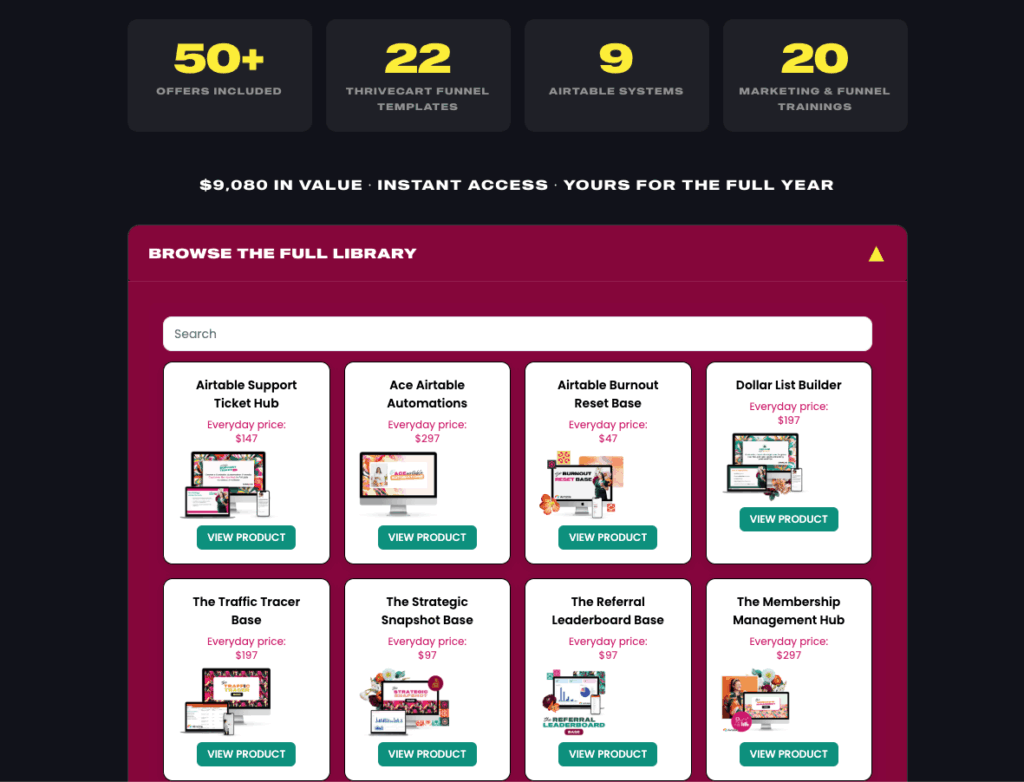
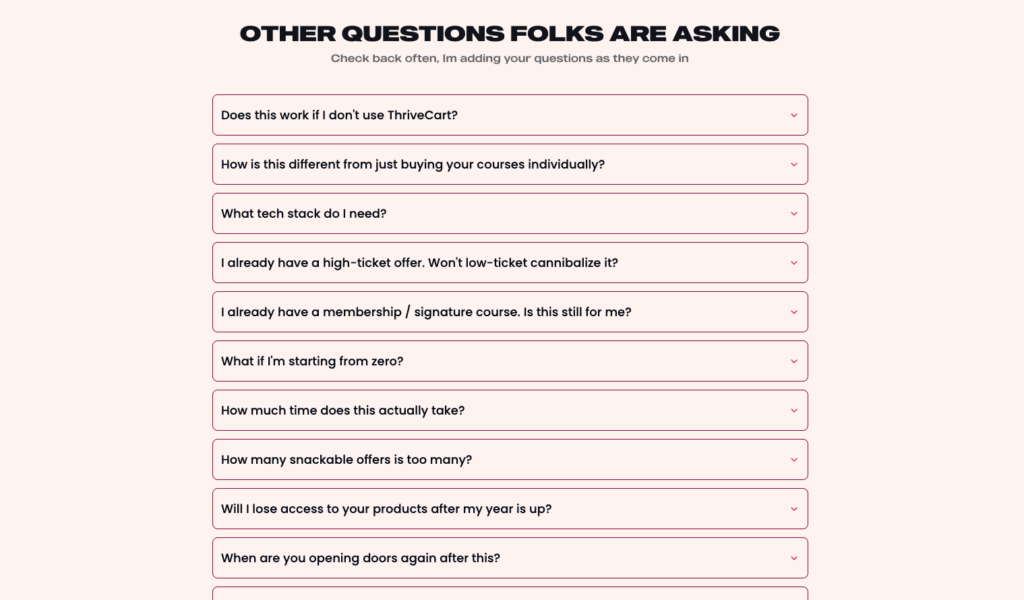
In a pinch, BlockBuilder can do a lot of what Softr and Shareables can do in terms of being able to take data in Airtable or Google Sheets and turn them into embeddable blocks like a grid, list or table. But. The email use case in particular is what makes BlockBuilder worth talking about for me and why I didn’t hesitate to grab this deal. Think about it — instead of manually updating a resources or links roundup at the bottom of every newsletter, you could create a block that pulls your latest affiliate deals, testimonials, or FAQs straight from Airtable or Sheets. In fact, I used BlockBuilder multiple times in my recent launch of Your Next 100, for the affiliate contest, on the sales page to showcase the 50+ offers included free with Your Next 100, for the growing FAQ that I updated quickly and easily, and inside the course itself for the program. Big love for BlockBuilders!
The use cases for BlockBuilder are pretty compelling: grid layouts, testimonial walls, self-updating FAQ accordions (no other tool in this comparison can put content into an accordion block — I like this a lot bc folks LOVE to poke around accordions), forms that push responses directly into Airtable, and polls and questions that can be embedded in emails.
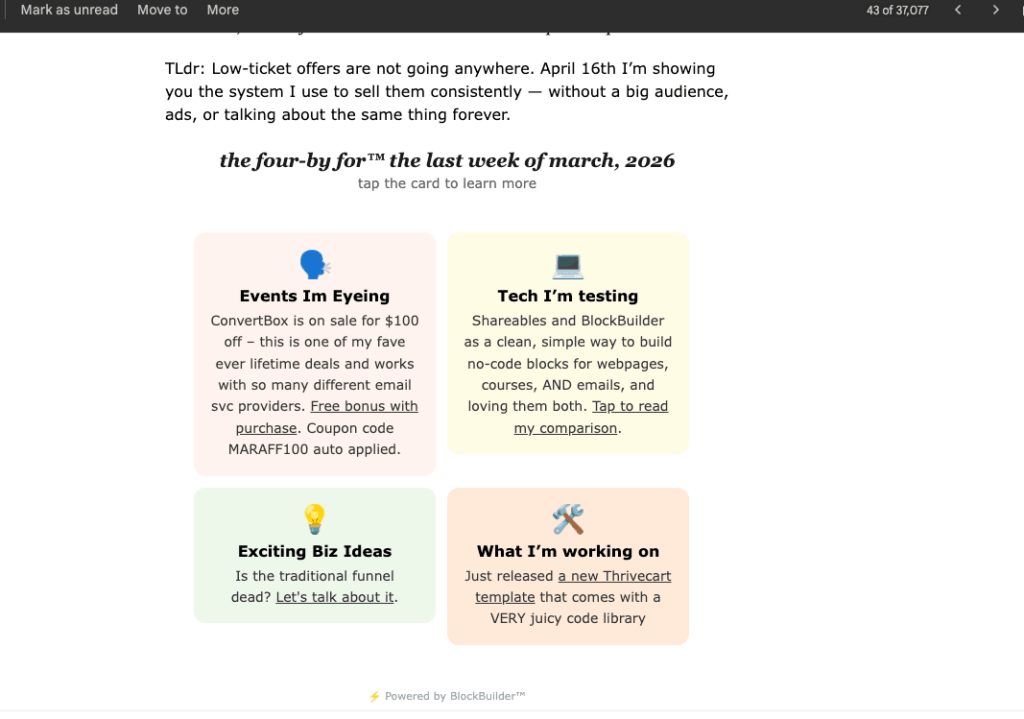
Speaking of emails — if you’re already using a strategy like my Four by For Footers to monetize your email newsletter footer, BlockBuilder is a natural complement. Imagine your footer automatically showing your latest affiliate picks or a live testimonial — pulled from Airtable, updated without touching your email template. That’s the kind of passive, set-it-and-forget-it power that makes email marketing worth the effort.
BlockBuilder is currently available at a founding member price of $149 (normally $297) with only 31 licences remaining at that price, then it’ll go up to $197 before finally landing at $297. Given how many cool use cases I can already think of plus what the founder Steph is constantly sharing — especially on the email embed side — I’d grab it now before that price increases.
→ Grab BlockBuilder at the founding member price
Compatible Email Service Providers for BlockBuilder
In order for you to drop a BlockBuilder embed in an email, your email service provider needs to allow HTML blocks. Popular choices that are compatible with BlockBuilder are:
Drip (my personal fave and what I use), Kit, ActiveCampaign, MailerLite, MailChimp, Encharge
Some email service providers don’t allow you to drop an html block in, so you might not be able to use BlockBuilder. A popular email service provider is FloDesk; unfortunately as of March 2026, you can’t drop an html block into a FloDesk email, so you won’t be able to use BlockBuilder with it.
What BlockBuilder Can Do That Shareables Can’t
Even with Shareables shipping fast, BlockBuilder still has some unique edges:
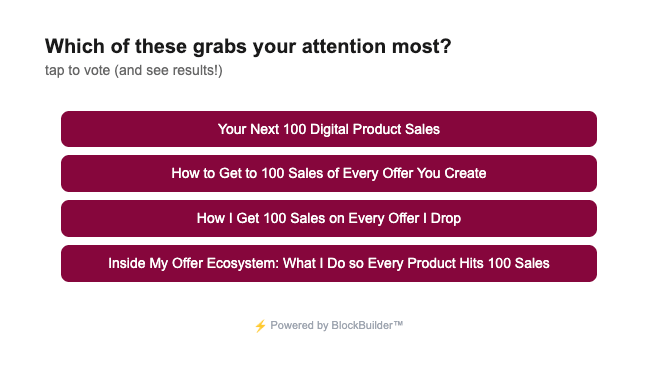
- Two-way data collection via polls and question blocks. BlockBuilder doesn’t just display data — it collects it. Polls and question blocks gather visitor responses and feed them directly back into Airtable or Google Sheets. Shareables displays your data but has no mechanism for collecting responses from visitors. I’ve used this twice and LOVE it – helped me lock in a webinar title that then went on to crush my registration goals!
- Forms that work today. BlockBuilder has a working form builder that pushes submissions directly into Airtable or Sheets. Shareables has forms on the roadmap, but they’re not here yet.
- Purpose-built email reliability. Shareables just launched email widgets on April 28 — literally two days before this post update went live. BlockBuilder has been built and tested around email embeds from day one. When it comes to rendering reliably across Gmail, Outlook, Apple Mail, and various ESPs, BlockBuilder has more mileage on this specific use case.
- Click-level analytics. BlockBuilder tracks views, clicks, and click-through rates at the individual block level. You can see exactly how a specific embed is performing. Shareables analytics are page/widget-level and display-only — no click tracking, no export.
Where Shareables pulls ahead: data source variety (12 vs 2), events calendar, auto-translate, payment gating, and a much more powerful page/embed builder overall. These are two different tools solving overlapping but not identical problems.
BlockBuilder Works Best For
- Simple grid and card layouts, with action buttons and optional detail pages
- Testimonial walls that auto-update from Airtable or Google Sheets
- Self-updating FAQ accordions (only BlockBuilder does this right now)
- Forms that push data directly into Airtable or Google Sheets
- Polls and questions you can add to your site or are embeddable in emails ← embedding polls and Q&A boxes right in an email? So good and useful, and as of right now, only BlockBuilders can do it
- Email newsletter footers, especially with a Four by For Footers-style strategy
- CREATORS, REJOICE: BlockBuilders lifetime deal features unlimited widgets, email embeds, forms, published self-updating blocks, and polls!
What to keep in mind about BlockBuilder
- It’s brand new — expect some bugs and a support team that’s actively building
- Embed-only — you need an existing website, page builder, or email platform
- No payment processing or user accounts
- Only integrates with Airtable and Google Sheets for now
Side-by-Side Comparison of Softr, Shareables, and BlockBuilder
| Feature | Softr | Shareables | BlockBuilder |
|---|---|---|---|
| Pricing | $49–$149/mo | $59–$589 lifetime (AppSumo) | $149 lifetime (founding) |
| Data Sources | Airtable + more | 12 sources: Airtable, GSheets, Notion, Smartsuite, Trello, AITable + more | Airtable, Google Sheets |
| Build Full Pages/Sites | ✅ | ⚠️ Single-widget pages; multi-page coming soon | ❌ |
| Embeddable Blocks | Paid plans only | ✅ | ✅ |
| Email Block Embeds | ❌ | ✅ | ✅ |
| Form Builder | ✅ | 🔜 Coming soon | ✅ |
| Two-Way Data Collection (Polls/Questions) | ❌ | ❌ | ✅ |
| Accordion / FAQ Block | ❌ | ✅ | ✅ |
| Events Calendar Widget | ❌ | ✅ | ❌ |
| Custom Domain | ✅ | ⚠️ Requires backend setup | N/A |
| Customizable Subdomain | ✅ | ✅ | N/A |
| Search & Filters | ✅ | ✅ | ✅ |
| Live Dashboard Preview | ❌ | ✅ | ✅ |
| Analytics (views + clicks) | ✅ | ⚠️ Display only, no export | ✅ |
| Auto-Translate (100+ languages) | ❌ | ✅ | ❌ |
| Button & Field Icons | ✅ | ✅ | ❌ |
| Payment Integration | ✅ | ✅ | ❌ |
| User Accounts / Login Gating | ✅ | 🔜 Coming soon | ❌ |
| Webhooks | ✅ | ❌ | ❌ |
| Built-in Automations | ✅ | ❌ | ❌ |
| Custom CSS/JS | ✅ | ⚠️ Tier 3+ only | ❌ |
| Password Protection | ✅ | ⚠️ Works but placement limited | ❌ |
| Maturity / Stability | Mature, established | Newer, shipping fast | Brand new, promising |
| Best For | Complex apps, portals, member sites | Embeds, directories, events, email widgets | Live blocks on web + email, two-way data |
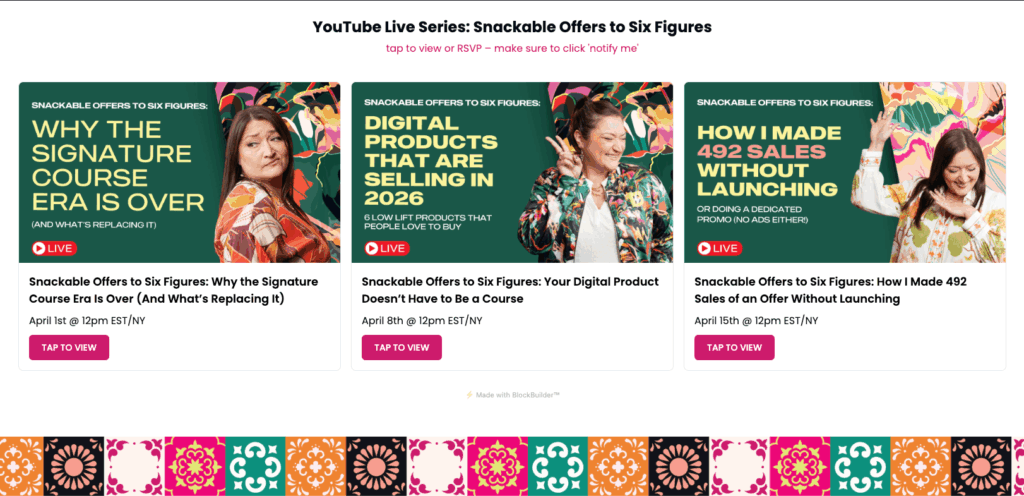
See my many BlockBuilder widgets in action – grid, cards, poll, video embed:
So… of Softr, Shareables, and BlockBuilder, Which One Should You Get?
Stick with (or start with) Softr if…
- You need full websites, apps, or member portals with login-protected content and real page builder flexibility
- You want to be able to gate content to logged-in users
- You rely on webhooks or built-in automations in your workflow
- You want multiple blocks on a single page with headers, footers, and legal pages
- Complexity, support quality, and long-term stability matter more than price
- You want done-for-you templates — check out Product + Affiliate Hub for Airtable which includes two Softr templates ready to go
Grab Shareables (on AppSumo) if…
The lifetime deal is ending on May 11, 2026 at 12pm CT/Chicago — this is the time to decide.
- You want Softr-style embed functionality without a monthly subscription
- You need beautiful, self-updating embeds for your website, courses, or resource pages
- You’re using multiple data sources, especially Notion, Smartsuite, or Trello
- You want analytics, payment gating, an events calendar, or auto-translation on your widgets
- You want to lock in lifetime access before forms, multi-page, and user accounts arrive and the price goes up
- Skip Tier 1. Tier 2 for most folks, Tier 3 if you’re a power user
⏰ Shareables is leaving AppSumo on May 11, 2026 at 12pm CT/Chicago. After that, it’s a monthly/annual subscription. If you’ve been considering it — don’t wait.
Add BlockBuilder if…
- You send email newsletters and want to pull dynamic content from Airtable or Google Sheets
- You use (or want to start) a Four by For Footers-style email footer strategy
- You want to collect audience data via polls, questions, or forms that feed into Airtable
- You want click-level analytics on your embedded content
- You want to get in at founding member pricing ($149) before it rises to $297
- You’re okay being an early adopter on a tool that’s actively being improved
Can You Use More Than One?
Absolutely – that’s what I’m doing now.
My current setup: Softr for complex, login-protected apps and member experiences. Shareables for public-facing embeds inside my courses, specifically the gorgeous Calendar block inside my group program, Your Next 100. BlockBuilder for live data blocks on sales pages, in courses, and polls in emails.
Each tool has its lane. If budget is a concern and you don’t need a full site builder, Shareables + BlockBuilder together are still a one-time investment that covers most use cases — and that’s a much better deal than Softr’s monthly fees alone.
Final Thoughts
If you’re a course creator, digital product seller, or online business owner who uses Airtable or Google Sheets, at least one of these tools belongs in your tech stack. The days of manually updating every page, every resource list, every testimonial wall are over.
Shareables is the most versatile option at the best price right now, and it’s shipping improvements faster than almost any tool I’ve seen. The AppSumo deal closes soon — once it’s gone, it goes monthly. Get it now.
And if you want live data blocks inside your emails, two-way data collection, or click-level analytics, BlockBuilder is worth picking up at the founding price while it’s still $149.
Already using Softr or want to see how I use it? I’ve written about it here, here, and here — or grab Product + Affiliate Hub for Airtable which includes two Softr templates ready to customize.